An errand you can hand over.
Book dinner, move an appointment, or ask a shop a question. Tell Vikki what you need, approve the details, and let it make the call.
Friday, 8:15 pm. Table for two.
See an outgoing call ✳ YOUR PERSONAL PHONE ASSISTANT
Ask Vikki to make a call. Let it answer when you can't. Reservations, messages, appointments. Come back to what happened.
10 free minutes. No card needed.
One assistant. Two kinds of help.
You decide what Vikki does. It keeps the conversation for you to read.
Book dinner, move an appointment, or ask a shop a question. Tell Vikki what you need, approve the details, and let it make the call.
When you miss or decline a call, supported carrier forwarding sends it to Vikki. It takes a message or an appointment request, then saves the conversation in your Inbox.
One balance for outgoing and incoming calls. Only connected time uses minutes, including greetings and time on hold.
When you need a call made
No phone tree for you to navigate.
No wondering how it went. Just the conversation, and what came of it.
Like this, for example.
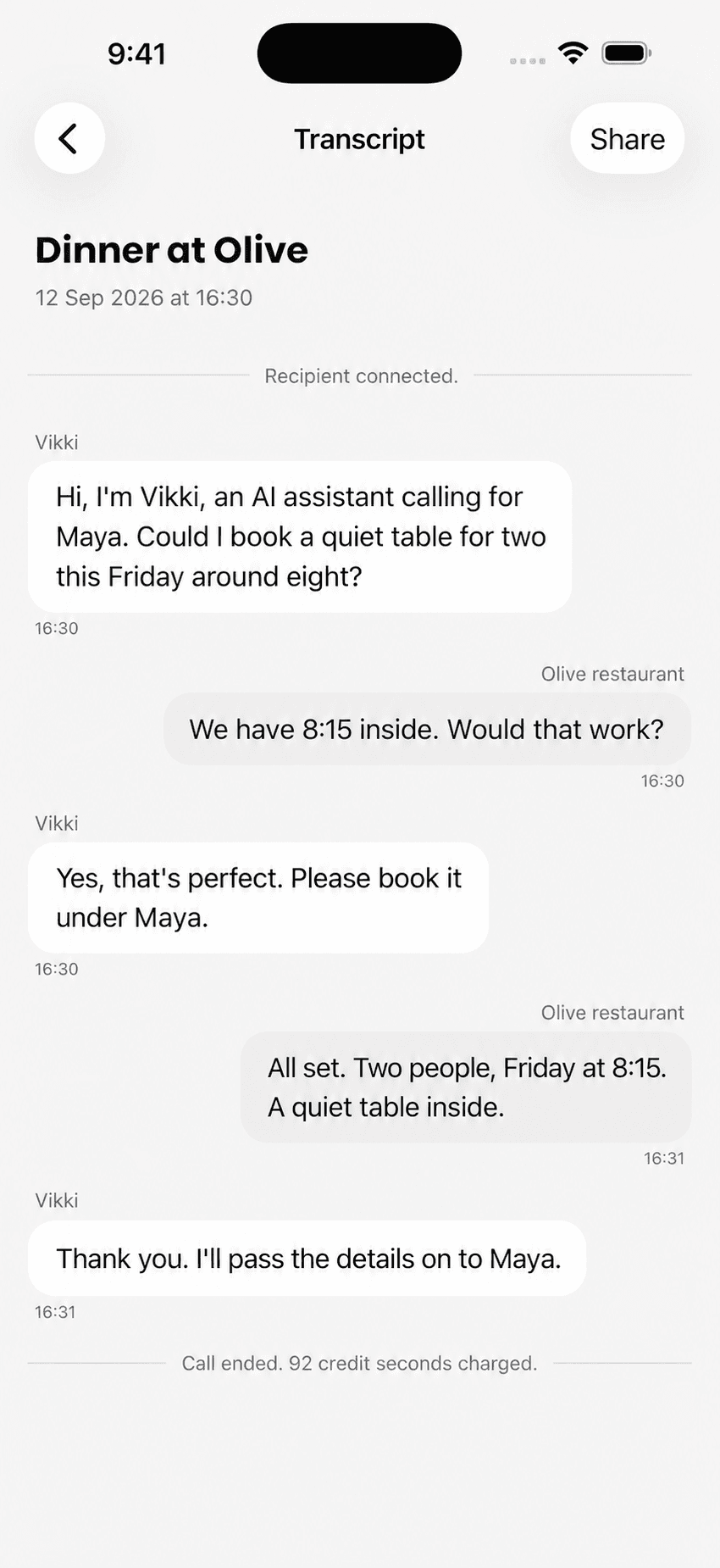
Book a quiet table for two. Friday, around 8 pm.

Hi, I'm Vikki, an AI assistant calling for Maya. Could I book a quiet table for two this Friday around eight?
Of course. I have 8:15 inside, away from the bar. Would that work?
That's within Maya's time window. Please book it under Maya, for two.
All set. Friday at 8:15, a quiet table inside for Maya. See you then!
Table booked. Friday, 8:15 pm. A quiet spot inside.
When someone calls you
Your own greeting. A short conversation. The caller's name, reason for calling, and what they need from you.
A message worth opening.
Set a maximum call length and a repeat-caller limit. Your preferences apply every time Vikki picks up.
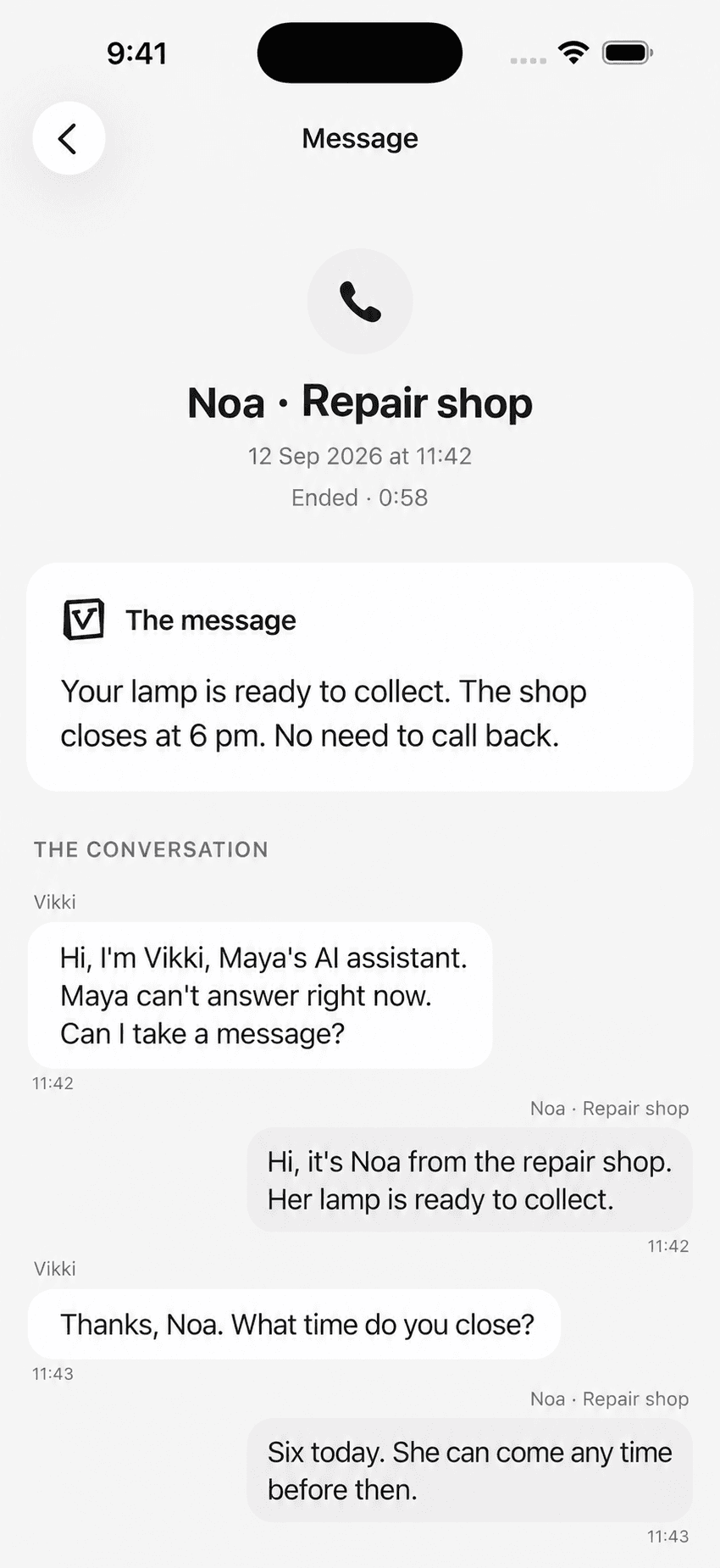
Maya declined the call during a meeting. Vikki answered the forwarded call.
Hi, I'm Vikki, Maya's AI assistant. She can't take your call right now. What would you like me to pass on?
It's Noa from the repair shop. Her lamp is ready. We're here until six.
I'll pass that on. Does Maya need to call you back?
No, she can just come and collect it. Thanks!
Your lamp is ready. Collect it before 6 pm. No reply needed.
Your calls, when you have a moment
Ask Vikki for a recap of unread incoming calls. Open a call for its summary and transcript. Messages stay unread until you open the finished call, so a quick recap doesn't clear your list.
Read a sample conversationNoa says your lamp is ready. The shop closes at 6. You don't need to call back.
Read Noa's exampleDaniel asked about Thursday at 10 for the kitchen light. He is waiting for you to confirm.
See the appointment-request exampleMaking a call for you
You bring the errand.
Vikki brings the phone manners.
Type it or talk it through. Vikki helps turn your request into a clear call brief, with a recipient and a goal.
Check the details, language, and facts Vikki can share. Call now or choose a time for later.
Follow the live transcript, or come back to the summary. If something needs you, it stays on your list.
Your number. Your instructions.
Answering is optional. Your carrier needs to support forwarding, and a real test must work before setup is complete.
Verify your personal number. Follow carrier-specific steps for missed and declined calls, then make a test call. Forwarding charges may depend on your carrier.
Write and preview a greeting. Add short instructions, such as asking for a name, callback number, and preferred appointment time. Choose the details Vikki should ask for and pass along.
Set call duration and repeat-caller limits. Defaults are 60 seconds and three answered calls per caller per hour. Hidden caller IDs are blocked unless you allow them.
Catch up in your Inbox. Open a call for its live or final transcript. Mobile notifications can let you know after an answered call ends.
Turn it off with the guide. Pausing Vikki does not remove forwarding from your carrier. Follow the removal steps to restore your previous phone setup.
The little details
The small things matter when
someone else is doing the talking.
An ordinary chat becomes a call brief. Ask Vikki to find a public business or give it the person you want to reach.
Make the call straight away or schedule it for a specific time. Cancel it any time before it starts.
Read both sides of the conversation as it happens. Keep the outcome, transcript, and call history together.
Save your preferences and choose which details Vikki can share. Set the greeting and instructions it follows when answering for you.
Review the brief, end a live call, or choose to retry. Vikki stays within the instructions you approve.
Vikki introduces itself as AI on outgoing and incoming calls. Outgoing calls use a Vikki number; incoming calls reach it through your carrier forwarding.
Try the conversation in your browser before you dial. A test run uses credits and does not contact the recipient, so you can check the brief first.
Outgoing calls stay with their tasks. Incoming calls have their own Inbox. Open a call for its summary and transcript, and decide what needs a follow-up.
Across the line
Book in Hebrew. Ask in English.
Choose the language before the call, and Vikki takes it from there.
One chosen language per call. The web interface is in English, with support for Hebrew text.
Set up missed-call forwarding with your carrier. Incoming and outgoing calls share your minute balance.
A little room in your day
One less thing on your list. See how a call feels.
One-time trial. No card needed.
10 minutes, on us
For the appointments and errands that keep adding up.
$12 billed monthly
60 minutes / month
A little more breathing room for a very full calendar.
$29 billed monthly
180 minutes / month
Prices in USD. Incoming and outgoing calls share your minutes. Connected time includes greetings and time on hold. Carrier forwarding charges may apply.
The pricing detailsA little help in your pocket
Give Vikki a call to make while you head out. Read a message between meetings. Your calls, transcripts, and next steps come with you.
For iPhone and Android. One account, wherever you pick up.
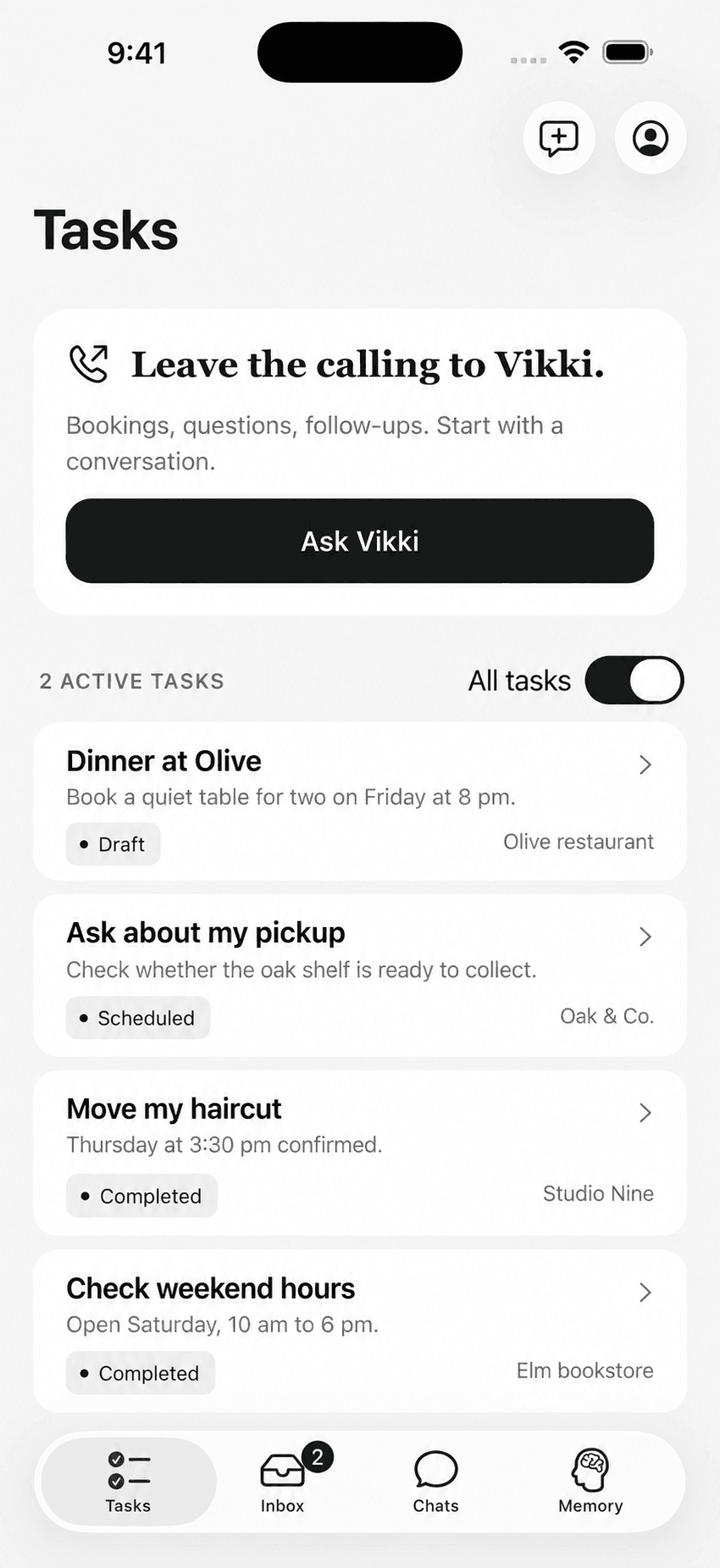
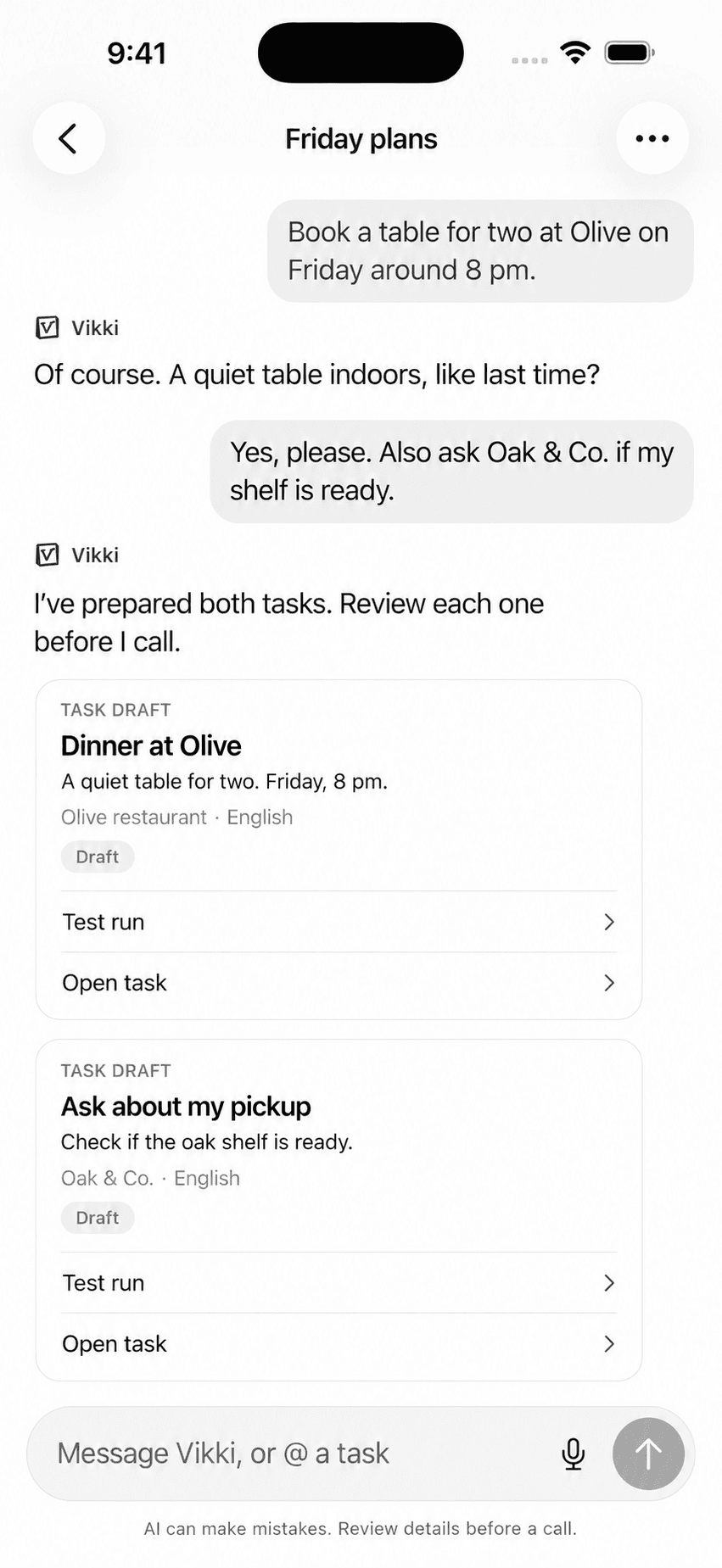
Bookings, pickups, and follow-ups in one place.
Fair questions
About calling out, picking up,
and reading what happened.
Choose 20 minutes for $5, 60 for $12, or 150 for $27. Top-ups are one-time purchases and work for incoming and outgoing calls. Plan minutes are used first and reset each month; top-up minutes stay in your balance until used.
Yes. Keep your existing number and set up forwarding for missed or declined calls. Vikki walks you through verification, carrier setup, and a test call. Your carrier may charge for forwarded calls.
Yes. Set your scheduling preferences and the details Vikki should collect. Appointment details stay with the call, so you can catch up later. You can also ask Vikki to make an outgoing call to book or reschedule for you.
Open your Inbox and choose a call to read its summary and transcript. Or ask 'What did I miss?' for a recap of unread calls, with links to each one. Recaps do not mark calls read. With mobile notifications enabled, Vikki can notify you after an answered call ends. The Inbox covers calls Vikki received, not every missed ring on your phone.
Answering follows your call-length, repeat-caller, and hidden-caller preferences. Keep credits available for connected calls. Vikki handles one live conversation at a time, and your Inbox shows the status of incoming calls.
Yes. Follow the turn-off guide to stop acceptance and remove your carrier's forwarding rules. Pausing Vikki or ending one call does not switch off forwarding at your carrier. Restore your previous voicemail arrangement using the guide.
Book a table, check whether a shop has your size, move an appointment, or ask a business a question. Give Vikki one recipient and a clear goal. You review the call details before it starts.
Yes. Vikki introduces itself as an AI assistant calling on your behalf. It uses a Vikki phone number and the call-facing name you have approved.
Yes. Call straight away or choose a time for a one-time scheduled call. You can cancel pending work and end a live call from your workspace.
You see what happened in the task history and can choose to try again. Vikki does not leave a voicemail or keep calling automatically.
Vikki calls Israeli phone numbers starting with +972, in Hebrew or English. Incoming answering uses forwarding from your personal number. Check your carrier's forwarding support and charges during setup.
Vikki keeps a text transcript and call events, but does not store raw call audio. Transcripts remain until you delete them or your account. You can manage your memory and delete your Vikki data in Settings.
No. Vikki cannot make payments, share card details, bypass identity checks, or place emergency calls. If a request goes beyond the approved instructions, the task comes back to you.
A LITTLE HELP WITH YOUR PHONE
Hand over an errand. Leave room for an incoming message.